

.png)
Magnettu's Competitors section exists to change that. It allows you to monitor up to 5 profiles in your industry, see how their metrics evolve over time, and identify what content is working for them. All in the same place where you already manage your strategy.

What you can do with this section
Once you set up your competitors, you'll have access to a level of information that goes far beyond manually checking profiles:
- See how your growth evolves in parallel with other relevant profiles in your industry
.png)
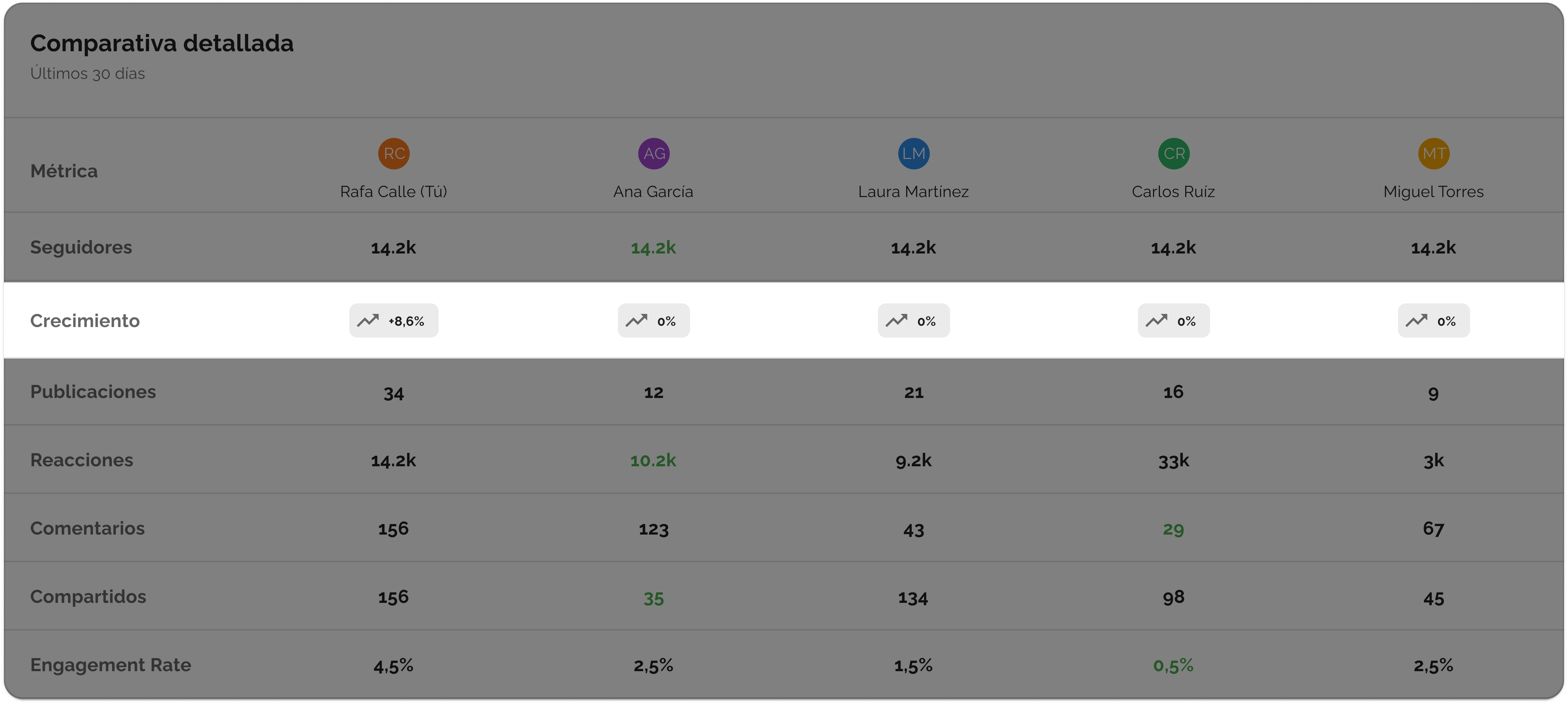
- Compare key metrics: followers, posts, reactions, comments, and shares
.png)
- Identify who generates the most impact in your vertical and with what type of content
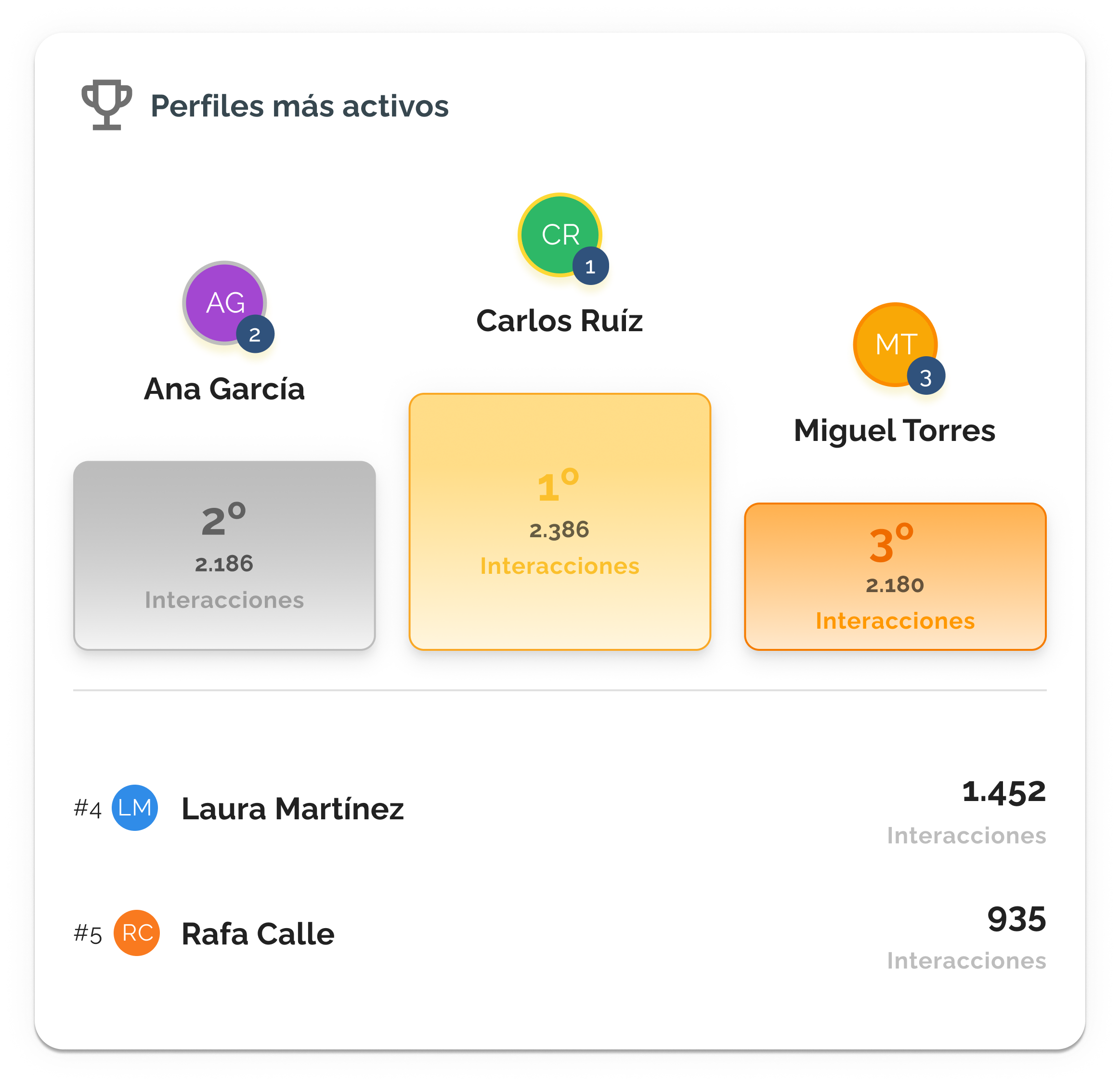
- Discover which posts have performed best among your competitors in recent months

That last point is especially valuable. It's not about copying, but about understanding what topics resonate with your audience right now and using that to refine your own narrative.
How to get started
Access the Competitors section from the side menu, under Reports and Analytics. From there, you can add profiles directly using the "Add competitor" button.
A few things to keep in mind from the start:
- You can have up to 5 competitors active at the same time
- Once a profile is added, you will see the status "Active synchronization" next to its name — this confirms that data is being collected normally
- Available time filters are: 1 month, 3 months, 6 months, and 12 months
The competitor limit and how to manage it effectively
The 5-profile limit isn't just simultaneous; it has an important component: it renews every 30 days.
This means that if you remove a competitor to add another, and you've already used all 5 slots for the cycle, you'll have to wait for those 30 days to pass before you can add a new one.
That's why it's worth being strategic from the start: choose carefully which 5 profiles you want to monitor and avoid unnecessary rotations.

How to use this strategically
Data is only useful if it's converted into action. One way to work with this section:
Compare
Start by identifying where you stand in your industry. Do you publish less? Is your engagement lower despite having more followers? Is someone growing very quickly who wasn't on your radar before? These questions define your true starting point.
Plan
With that clear picture, Magnettu's AI can help you build a strategy that leverages the gaps your competitors aren't covering. It's not about doing the same as them, but about finding where you can gain ground.
Acciona
Publish with a stronger strategy. Knowing which formats generate the most reactions in your industry, which topics are gaining traction right now, and how often the fastest-growing accounts publish, every post you launch will have more context behind it.
Potential issues and why they occur
There are some tool behaviors that might be surprising at first. Here, we explain them so you don't waste time misinterpreting them.
You see less data than expected for a very active profile: Magnettu collects the last 50 posts from each profile. If someone publishes very frequently, those 50 posts might only represent the last 2 or 3 months of activity. If you apply the 12-month filter, you will see an incomplete period — this is not an error, it's simply the volume of data available for that profile.

A competitor's follower growth starts from zero: A profile's follower history is not accessible from the moment you add it: we can only measure its evolution from that point onwards. What we do show from the start is the current total number of followers. Over time, the growth curve will become more representative.
You don't see your own data: Most commonly, the connection to your LinkedIn account has expired. You can reconnect it from the Personal Profiles section in the settings. If the problem persists after doing so, please write to us at sabrina.michelsen@magnettu.com and we'll review it with you.

You cannot add a competitor: If the process of adding a profile doesn't work, it might be a temporary technical error. We are in active development and work every day to make the experience more stable. If this happens, please write to us and we'll look into it.

A teammate has access and you don't: Access to this section depends on your role within the workspace. Users with an Admin or Shell Adminprofile, and also those with the Manage Settingspermission enabled, can view and manage competitors. If you believe you should have access, please consult with your Magnettu account administrator.

Your feedback shapes what comes next
Magnettu improves with your input. If something isn't working as you expected, you have an idea, or you just want to tell us how things are going, write to us at sabrina.michelsen@magnettu.com— as many times as you like.
Still haven't explored the Competitors section? Go in and try Magnettu free for 7 days and add your first profile today.
.png)
%20(43).png)
%20(1).png)
%20(8).png)
%20(23).png)
%20(21).png)


