
.png)
Reviewing content as a team has always been more complicated than it should be.
Someone shares a draft. You see something you'd change, copy the snippet, paste it into comments, and write "I'd phrase this differently." The author receives it, searches for where that piece was... and five minutes are already lost on something that should be instantaneous.
Feedback existed, but it lived disconnected from the text. Without context, without clarity, without a fixed place to anchor opinions.
At Magnettu, we've solved this with a new feature: Feedback.
Why feedback disconnected from the text doesn't work
When you leave a general comment on a draft — whether via Slack, email, or in the comment field itself without anchoring it to anything — the recipient has to do extra work: interpret which part you're referring to, find it in the text, and understand exactly what you meant.
"The tone at the beginning is too formal" could refer to the first sentence or the entire first paragraph. "I'd phrase it differently" says nothing without knowing what you'd change and how.
The result is ambiguity. And ambiguity generates more messages, more rounds of revision, and more time spent on coordination instead of content.
How Feedback works in Magnettu
Within Magnettu's post editor, there's now a feature called Feedback. It's designed so that collaborators, clients, or reviewers can give their feedback directly on the text — without leaving the editor, without copying anything, and without leaving anything open to interpretation.
It has two parts:
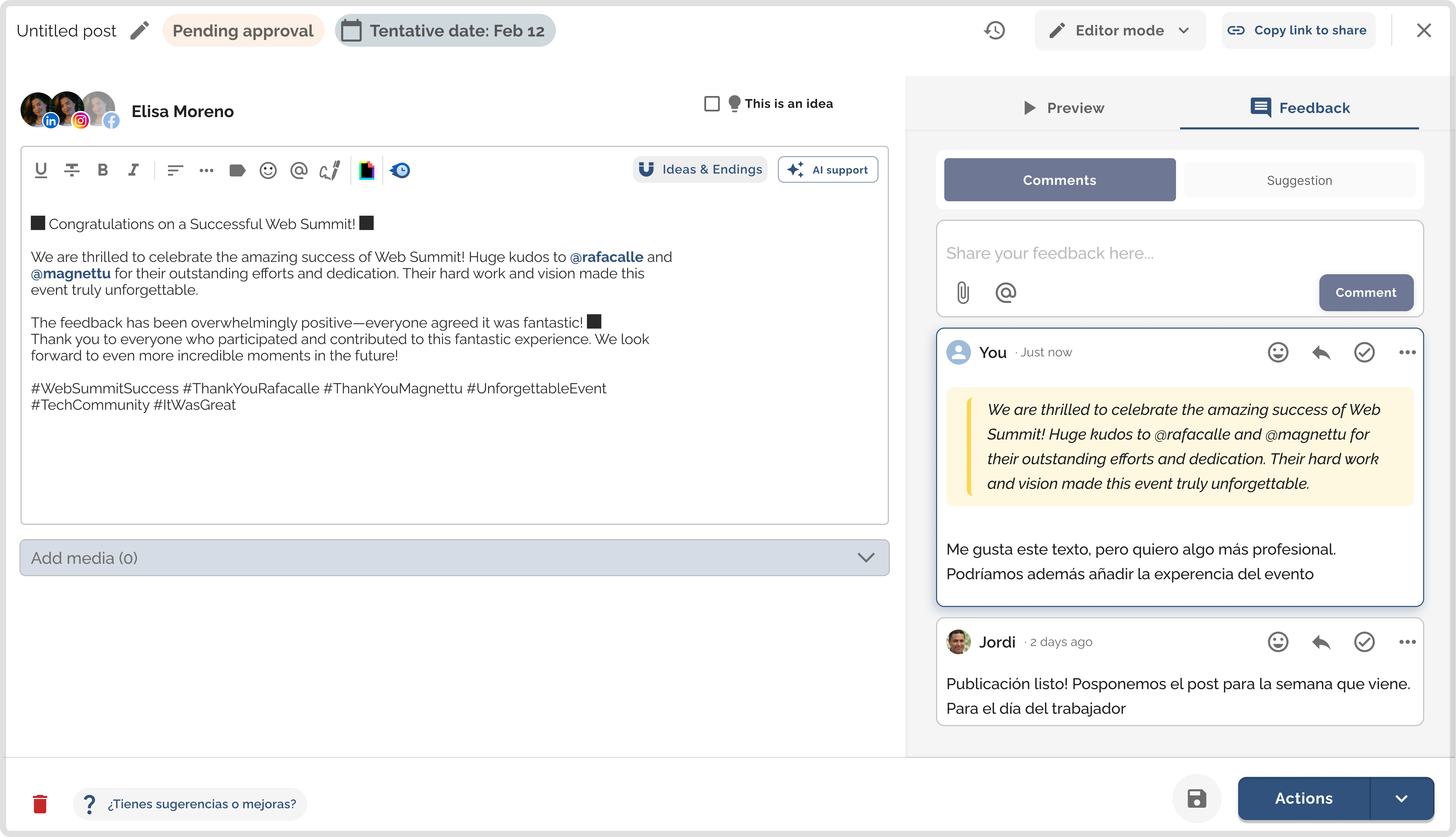
In-context comments
When there's text in the editor, you can select any snippet — a word, a phrase, a paragraph — and leave an anchored comment right there. You can also leave general comments if what you want to say applies to the post as a whole.
Comments can be replied to if a conversation is needed, and marked as resolved once addressed. Everything is recorded and visible to anyone working on that post.
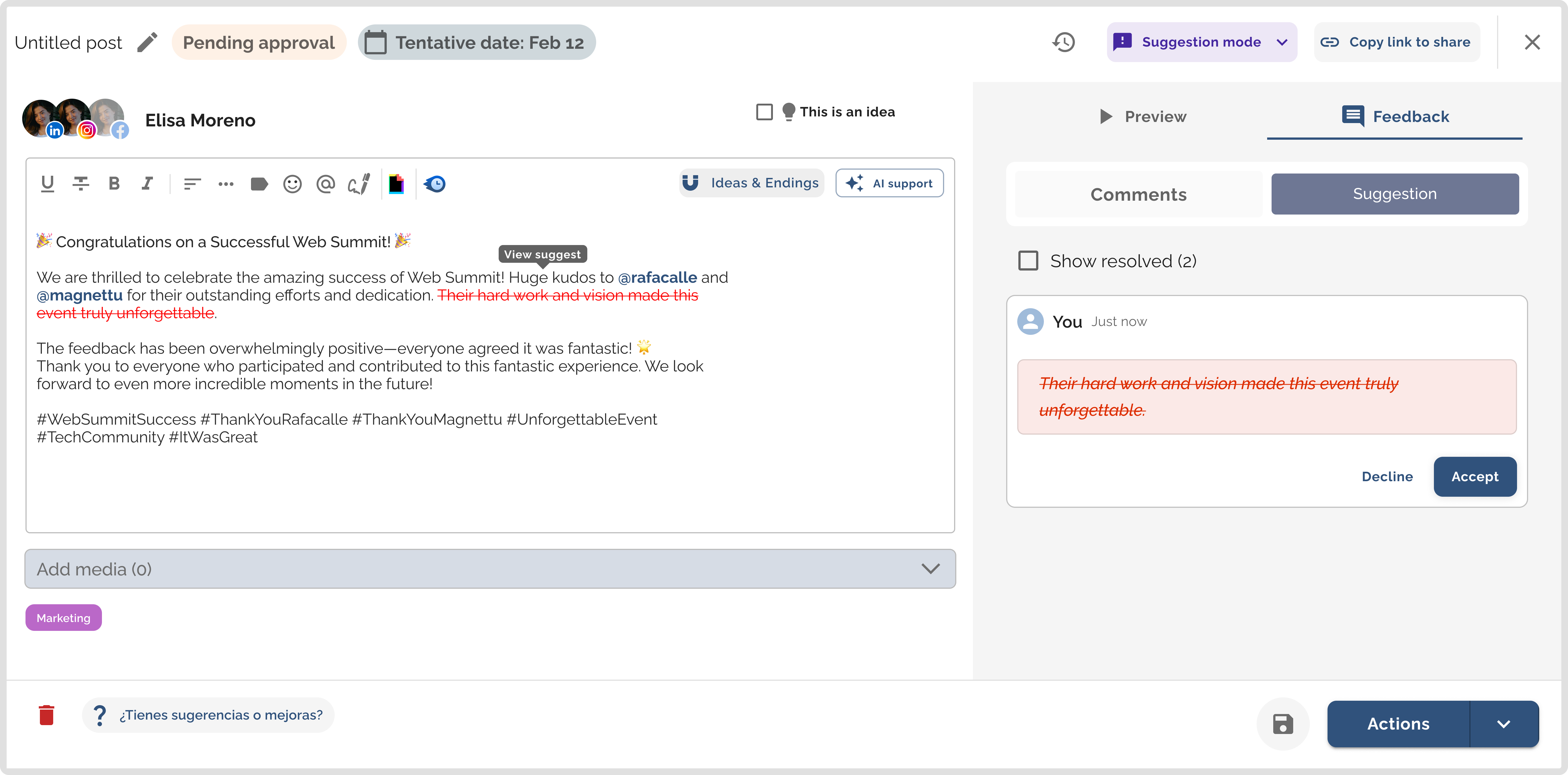
Suggestion Mode
Once you save the post, the option to activate Suggestion Mode appears. You enter, edit the text directly as if it were yours, and the system marks what you add in green and what you delete in red — just like in Google Docs.
The recipient of the suggestions reviews them one by one and decides: accept or reject. No meetings, no additional explanations, no misunderstandings.
Who benefits most from this
- Agencies that manage content for clients:
This is perhaps where it's most noticeable. The usual dynamic in an agency is: the team creates the content, the client reviews it, there are changes, they're sent by email or message, someone applies them, it's resent for approval... and so on until it's published.
With Feedback, the client enters the editor directly, comments on what they want to change right where it is, or proposes the change in suggestion mode. The team sees it, accepts or discusses it, and the post moves forward. The client stops being an external step in the process and becomes part of it.
- Marketing departments with multiple authors
When a content manager handles posts for multiple profiles within a company, reviews are constant. With in-context comments, notes go exactly where they need to. The author knows what to change, why, and where. Reviews are faster and don't rely on anyone interpreting anything.
- LinkedIn training and bootcamps
If you train people in content creation, feedback is a central part of the process. Being able to comment directly on the student's text — pointing out exactly what works and what doesn't — makes learning more concrete and actionable.
- Any team where someone reviews before publishing
If there's an approver in the process — whether it's a director, a client, or a team member — that step now has a clear place within the tool. No friction, no steps outside the workflow.
The result: real collaboration within the editor
What changes with Feedback isn't just convenience. It's the quality of the entire process.
When feedback is anchored to the text, the author doesn't have to guess anything. When suggestions can be accepted or rejected with a click, revisions don't turn into negotiations. And when everything happens within the editor, there's no information scattered across three different channels.
Less noise. More speed. Posts that truly improve with each round.
Not using Magnettu yet? Try it free for 7 days and take your team's LinkedIn content collaboration to the next level.
%20(6).png)
%20(1).png)
%20(43).png)
%20(40).png)
%20(29).png)